
Coda
Docs that work like apps — for teams who think in formulas
Tool Overview
Tool Type
All-in-one collaborative workspace
Core Purpose
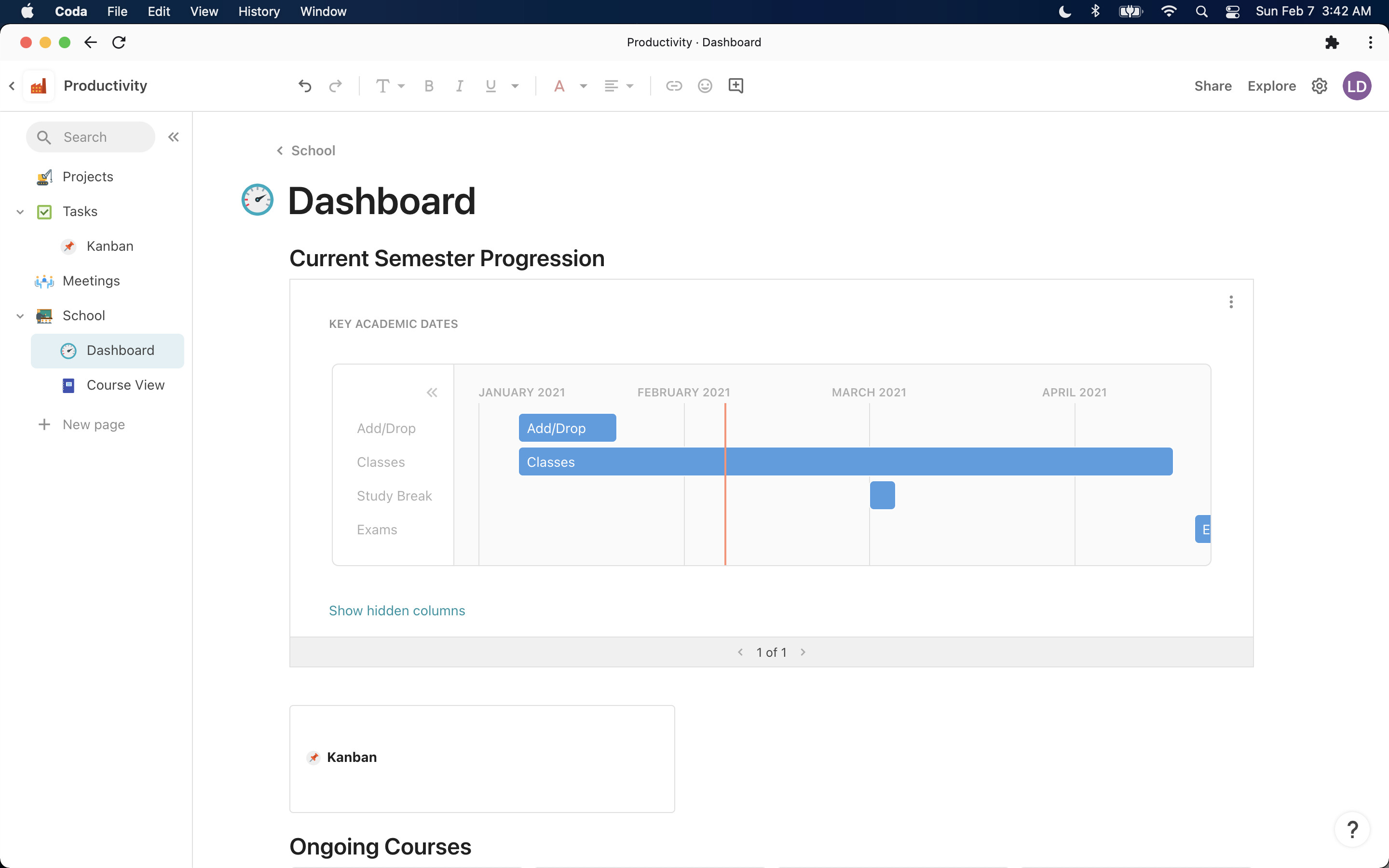
Coda reimagines documents as interactive applications where text, databases, and automations coexist. Positioning itself beyond both Notion and traditional docs, Coda emphasizes powerful formulas, packs (integrations), and buttons that transform static pages into dynamic tools. Teams choose Coda when they want to build custom workflows without code, treating docs as a flexible canvas for apps. The platform excels for product managers and operations teams who think in formulas and want programmatic control over their workspace. While powerful for technical users, its formula-centric approach creates a steeper learning curve than visual alternatives.
"Coda reimagines documents as interactive applications where text, databases, and automations coexist"
Screenshots


The Perfect Tool For...
- •Teams wanting docs, databases, and automations unified
- •Product managers building living roadmaps and specs
- •Operations teams creating custom trackers and dashboards
- •Startups needing flexible tools that grow with changing needs
- •Power users who love formulas and programmatic control
Avoid If...
- •You want simple, opinionated tools without setup complexity
- •Your team needs traditional project management features
- •You require extensive third-party integrations and marketplace
- •Simplicity and minimal learning curve are priorities
- •You need proven enterprise security and compliance
Ideal Use Cases
Product Specs & Roadmaps
Write product requirements with embedded tables, timelines, and two-way syncs to task trackers in one living document
Team Wiki + Tracker
Build company wiki with embedded databases for tracking OKRs, hiring, and processes in interconnected docs
Custom Workflow Apps
Create bespoke tools like applicant tracking systems or inventory managers using docs, tables, and buttons
Coda has been recommended by Find Your Martech 11 times.
Detailed Evaluation
Organizational Fit for Coda
Early-stage start-up / solo
goodSmall team / agency
goodSMB / growing company
goodEstablished / large org
limitedFind Your Martech Scores for Coda
Q1: What will you mainly use the tool for?
Q2: How many people will collaborate in the tool?
Q3: How structured or complex are your workflows?
Q4: What matters more to you: simplicity or flexibility?
Q5: How important is planning over time (dates, timelines, dependencies)?
Key Features
Strengths
- Unmatched formula power rivaling spreadsheets in doc format
- Flexible enough to build custom apps for unique workflows
- Strong for product managers writing specs with live data
- Templates provide excellent starting points for common use cases
- Free tier genuinely useful for individuals and small teams
Weaknesses
- Steep learning curve for non-technical users and formula novices
- Performance degrades with large docs containing many tables
- Smaller community and fewer templates than Notion
- Interface can feel cluttered when docs grow complex
- Not purpose-built for traditional project management
Communication Tool Synergies — Coda
These are communication tools that work particularly well with Coda.
Coda docs and automations integrate with Slack for notifications.
Design Tool Synergies — Coda
These are design tools that work particularly well with Coda.
Interactive docs embed Figma designs directly into planning and decision workflows.
Brainstorming and synthesis live inside collaborative Coda docs.
Cost Profile
Mid-market · Free plan · Increases quickly
Free plan works for individuals and small teams. Pricing scales per user, and advanced automation, integrations, and governance features push teams into higher tiers as complexity grows.
Alternatives
Explore More Reviews
Want Personalized Tool Recommendations?
Take our questionnaire to get customized recommendations based on your specific needs, team size, and budget.
Start the QuizStop Wasting Time on the Wrong Tools
Stop wasting time (and budget) testing endless marketing tools that don't actually fit your needs. Every business is different, your goals, team size, workflow, and growth stage all require a tailored solution, not a generic "top 10 tools" list. Our service helps you cut through the noise: a simple questionnaire-style quiz analyzes how you work and delivers clear, practical recommendations for the marketing tech that truly suits you.
